![subitup-white-small.png]](https://support.subitup.com/hs-fs/hubfs/subitup-white-small.png?height=40&name=subitup-white-small.png)
1. On the SubItUp log-in screen, enter in your email address and password.
2. Select whether you are logging in for a MANAGER or EMPLOYEE account.
3. Click the LOG-IN icon.
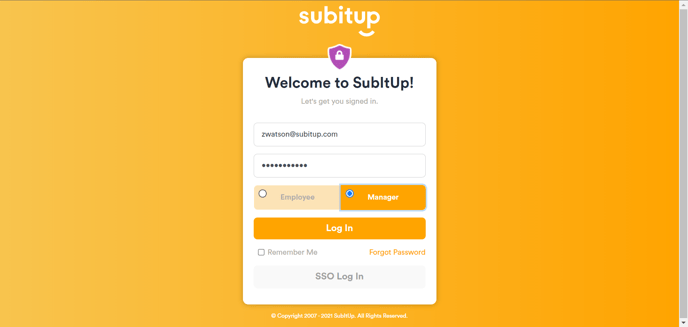
NOTE: If you do not remember your password, click on the FORGOT PASSWORD icon and follow the steps listed here.
4. On the next screen, if you have not yet entered in a phone number for 2FA / MFA, you will be instructed to do so. Please ensure this number is of a device that is accessible to you and has text messaging capabilities. If you do not wish to use MFA at this time, select SKIP MFA.
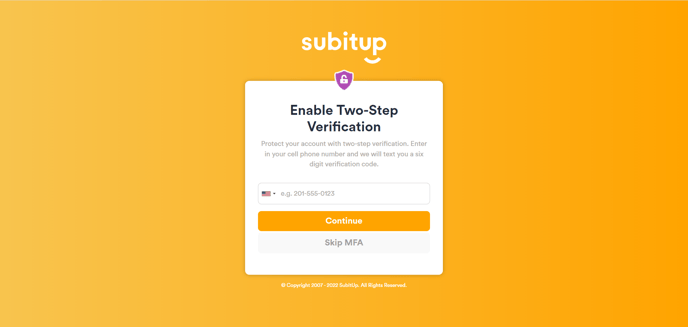
5. Click CONTINUE.
6. A 6-digit verification code will be sent to your device. Enter in this code on the following screen.
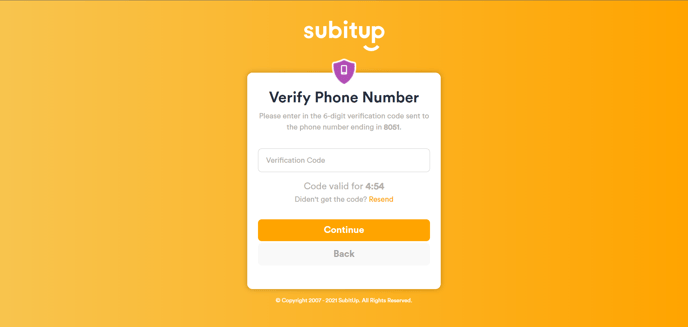
NOTE: You will have five minutes to enter in the code. If you do not receive the code, click RESEND.
7. You have successfully logged into your SubItUp account!